Curator Live vs Snap360App
Curator photo booth software turns an iPad into the hub of almost any booth, including a camera body worth more than the tablet. Snap360App does one format from a phone on the arm. Which one suits you depends on how many kinds of machine you own, and on whether you bill per event or per month.
Curator Live vs Snap360App, Point by Point
Taken from each vendor's own site, help centre and store listing. Where a vendor does not publish something, the row says so rather than fill the gap. Checked in August 2026, and both companies revise their pricing.
| What you are comparing | Snap360App | Curator Live |
|---|---|---|
| Devices | iPhone, iPad and Android phones and tablets. Not computers. | iPad Air 3 and newer, iPhone X and newer, on iOS 16 or later. Mac listed as coming soon, no Android app. |
| Formats covered | 360 platforms, aerial 360, iPad booths and Glambot, as named on the vendor site. | Photo booths, 360 spinners, roamers and photography setups, as named on the vendor site. |
| 360 capture | The entire product. Time ramping, automatic start on movement, remote control, GoPro capture. | Supported, with slow motion video and higher recommended device storage for 360 and video work. |
| External camera | GoPro, with automatic start on each rotation. No DSLR support documented. | Around 150 published bodies across Canon, Nikon, Olympus and Sony, over USB to the iPad. |
| Printing | Not documented. The output is video. | USB from the iPad to DNP and Citizen printers, AirPrint, or a print server on a Mac or PC. |
| Effects | Filters and frames, plus AI generated frames on the paid plans. | Green screen, AI background removal, AI photo manipulation, digital props, face morphing and a large filter set. |
| Free access | Free tier with the full workflow and a watermark on the output, with no time limit. | A watermarked demo and a 14 day trial, plus a free onboarding call for new customers. |
| Published price | Pro from €24.99 per month or €239.99 per year on the vendor site. Diamond Pro above that. | Standard $29 per event, $69 per month or $499 per year, up to Agency Pro at $249 per month. |
| Paying per event | Not offered. The plans are weekly, monthly, quarterly or yearly. | Yes, and the vendor states a per event activation stays live for three days. |
| Sharing | QR, AirDrop, WhatsApp, email, social and Bluetooth, with an online and an offline gallery. | AirDrop, QR without internet, social networks, text and email through a sharing station, and galleries. |
| White label | Custom frames, intro and outro and your own images. No white label offer published. | White label URLs and emails, published as a $449 per year or $59 per month add on. |
Is Curator Live Worth It, and for Whom
A Curator Live photo booth is doing something technically harder than Snap360App: driving roughly 150 professional camera bodies and dye sublimation printers straight from a tablet, with no computer in the middle. That is worth saying plainly before any recommendation, and it is what the pricing is actually buying.
What Curator Live Does Better
- Camera support at a serious level. Roughly 150 published bodies including Olympus and OM System, which most competitors do not touch. If you own a camera already, check that list before anything else.
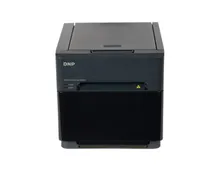
- Printing straight from the iPad. USB to DNP and Citizen without a computer in the middle, which is a genuinely elegant answer for a print booth. Our DNP printer page covers those models.
- Per event pricing. $29 for a Standard activation is honest pricing for an operator who works ten dates a year, and Snap360App does not offer an equivalent.
- A deeper effects set. Green screen, AI background removal, digital props and face morphing, against frames and filters on the other side.
- A published white label path. Priced, documented and available to buy, which is what an agency client asks for.
What Snap360App Does Better
- Android exists. Curator Live is iPad and iPhone only. Snap360App is on both stores, so the tablet that replaces a broken one is a budget decision, not an Apple decision.
- It is a 360 product, not a 360 mode. Automatic start on movement, remote control, time ramping and GoPro capture are the core of it, so setup on site is about the clip and nothing else.
- Free testing with no clock. The watermarked tier does not expire, against a 14 day trial on the other side.
- A lower device requirement. Curator Live asks for iPad Air 3 or newer with 128 GB for video and 360 work. Snap360App runs on the phone in your pocket.
The Curator Live Alternative We Fit, and Why
If your business is built on a camera body and a printer, Curator Live is a strong answer and its per event pricing suits an operator who works a handful of dates a year. We would say the same thing to a customer standing in front of us.
On the 360 platforms we build we configure Snap360App, for reasons that are about the machine. It is designed for 360 platforms rather than covering them alongside four other formats. It runs on iOS and Android, so it does not choose your hardware for you. And it arrives configured: we set it up against the platform, the camera and the lighting before the booth ships, and it goes out included with the machine instead of as a separate subscription you sort out yourself.
Where we would send you elsewhere: if you need per event billing rather than a subscription, or a documented white label offer, Curator Live publishes both and Snap360App does not. Those are real gaps and it would be dishonest to bury them at the bottom of a comparison table.
The full criteria are in the 360 photo booth app guide and the photo booth app guide, the stack is on photo booth software, and the machines are on photo booths for sale, from €2,771 plus VAT for a 360 platform.
Try Snap360App Free
Free to download and test on iOS and Android, and the app we configure on the 360 platforms we build. Install it, run a real session on your own hardware and judge it on your own footage instead of a demo reel.
Rated 4.9 out of 5 from 8,657 reviews, as published by Snap360.
Frequently Asked Questions
Curator Live vs Snap360App: which one for a 360 platform?
Snap360App if the spinner is the machine you own. Curator Live supports 360 with slow motion and a higher storage recommendation, but it is one format inside an iPad booth platform built around cameras and printers. Snap360App starts on movement, ramps the speed, takes a GoPro and runs on Android as well as iPad, so the replacement device is a budget decision.
What devices does Curator Live run on?
iPads and iPhones. The vendor lists iPad Air 3 and newer and iPhone X and newer, on iOS 16 or later, and recommends 128 GB of storage for video booths and Glambots. Mac support is described as coming soon and there is no Google Play listing. Snap360App is published on both the App Store and Google Play.
Does Curator Live support 360 booths?
Yes. It names 360 spinners in its own positioning, publishes slow motion video for them and recommends higher storage on devices used for video and 360 work. It is a broad iPad booth platform that covers 360 among several formats.
Which one connects to a DSLR?
Curator Live, comfortably. It publishes a compatibility list of roughly 150 bodies across Canon, Nikon, Olympus and Sony, connected to the iPad over USB. Snap360App documents GoPro capture and does not claim DSLR support, because a spinning arm is not where a DSLR usually lives.
How does Curator photo booth software pricing compare?
Curator Live pricing is published in full: Standard at $29 per event, $69 per month or $499 per year, Event Pro at $59, $149 and $1,499, and Agency Pro at $99, $249 and $2,499, with white label URLs and emails as a $449 per year add on. Snap360App publishes a free watermarked tier, Pro from €24.99 per month or €239.99 per year, and Diamond Pro above it. Per event pricing is worth a look if you work a handful of dates a year.
What do you install on the platforms you sell?
Snap360App, configured against the platform, the camera and the lighting before the machine ships, and included with the booth rather than sold as a separate subscription. What we look for in a 360 app is set out in our 360 app guide.
Talk to a Photo Booth Specialist
Tell us about your project and we will recommend the right booth, printer and software setup, with transparent pricing, all prices plus VAT.
Get a Free Quote